

Key Takeaways
- A false positive vulnerability occurs when a scanner flags a potential flaw that doesn’t actually exist.
- They often stem from outdated vulnerability databases, poor configuration, and lack of patch context.
- TuxCare Radar helps security teams minimize false positives with patch-aware scanning, AI-driven risk scoring, and actionable remediation guidance.
So you just finished running a vulnerability scan and immediately hundreds of alerts pop up. But as your team goes through them, many of them are revealed to not be real threats at all – or have already been patched. These are called false positive vulnerabilities which waste time and resources, create alert fatigue, and distract security teams from addressing real risks.
In this article, we’ll explain what causes false positives, how to validate vulnerability findings efficiently, and proven ways to reduce them.
What Is A False Positive Vulnerability?
A false positive vulnerability is an error in detection where a vulnerability scanner or other security tool incorrectly reports the presence of a flaw. The scanner thinks it found a security vulnerability, but there’s no real risk to enact a vulnerability response.
These false alerts are among the most common frustrations for security teams, especially in complex Linux environments with backported patches. For example, a Linux vulnerability scanner might flag a CVE in the Linux kernel even though the system is already running a patched version from the vendor. The version check matches the upstream identifier, but without patch context, it triggers a false alarm.
Why Do False Positive Vulnerabilities Happen?
To effectively combat false positives, it is essential to understand their origins. These erroneous alerts are not random; they stem from specific technical and logical limitations in the scanning process. A vulnerability scanner works by checking for software versions, signatures, behaviors, and configurations associated with known vulnerabilities. When the evidence it gathers is incomplete or misleading, it can draw the wrong conclusion, creating a false positive that demands human intervention or additional tools to debunk.
There are several common root causes that contribute to these errors:
Outdated vulnerability database: In some cases, scanning tools flag CVEs that have already been patched in your environment but aren’t updated in the database.
Improperly configured scanner: When scans are run without proper configuration, they often produce irrelevant alerts.
Backported patches or custom kernels: Linux systems with backported fixes or custom patches applied may not be recognized by the scanners.
False matches from legacy software: Older software components may incorrectly match the CVE patterns and thus generate alerts that are not actionable.
Note:
While false positives flag issues that don’t exist, the opposite, a false negative, occurs when a real vulnerability goes undetected. Have you ever seen a report with a false negative?
Risks of Ignoring or Mismanaging False Positive Vulnerabilities
False positive vulnerabilities are more than just a minor nuisance. Within your vulnerability scanning strategy, improper handling of these situations might lead to severe consequences in your enterprise’s operations, security, and compliance. What are these risks?
Wasted Analyst Hours
The process of investigating false positives can take away a lot of time and energy from your security team. Analysts may spend several hours validating vulnerabilities that are not present or have already been fixed and need no vulnerability response plan. In large-scale Linux environments, the situation is even worse, as hundreds or even thousands of alerts can show up after a scan. The more time spent on non-issues, the longer real vulnerabilities remain unaddressed. This inefficiency can result in backlog growth, security projects get delayed, and the overall effectiveness of operations decline in the long run.
Alert Fatigue
Alert fatigue in cybersecurity refers to a state where security teams become desensitized to incoming alerts. This means analysts start dismissing or gradually ignoring warnings because they assume the majority are false positives. Due to which, sometimes real ones are also missed. This can be very risky, especially in the case of Linux systems that hold critical production workloads; where missing a true vulnerability could result in system compromise. Beyond that, alert fatigue reduces morale and productivity, making the team slower to respond and increasing the risk of undetected exploits.
Delayed Patch Deployment
Time spent validating false positives results in delayed patching for true vulnerabilities. In environments that require continuous uptime, such as Linux servers powering enterprise applications, these delays can leave the systems to be exposed longer than necessary. Additionally, it increases the window of opportunity for attackers to exploit actual vulnerabilities. This risk is amplified in organizations with multiple servers or complex environments, where coordination of patching schedules is already difficult.
Compliance and Audit Issues
Organizations relying on inaccurate vulnerability reports carry risks of running into compliance problems. Auditors require clear evidence that security risks are being managed actively. False positives can mislead the actual security situation, making it seem that either vulnerabilities are not being dealt with or the reporting is not trustworthy. This can lead to failed audits, fines, or regulatory scrutiny, particularly in industries with strict cybersecurity standards such as finance, healthcare, or government.
Misallocation of Resources
False positives management, and all the time it involves, can divert both human and financial resources from other high-priority security tasks. Security budgets, staff time, and investments in scanning tools, all may end up going to managing issues that do not exist. Over time, this misallocation can reduce overall security efficiency, erode ROI on security technologies, and potentially compromise enterprise protection. In Linux environments with continuous patching needs, the ability to prioritize real risks ensures that resources are used effectively, maximizing both security coverage and operational efficiency.
Stats: According to the 2022 Cloud Security Alert Fatigue Report by Orca Security, nearly 60% of IT professionals receive more than 500 security alerts every day and spend over 20% of their time prioritizing them. Despite high confidence in their tools, 43% admitted that 40% of alerts were false positives.
How to Validate a Vulnerability Finding
Validating vulnerabilities is important because it not only eliminates the possibility of spending time on false positives but also allows real threats to be dealt with quickly. A systematic approach helps teams distinguish between alerts that require action and those that can be safely ignored.
1. Verify Version and Package Information
The version of the software, the name of the package, the release date, and any other relevant asset information should all be checked on the system that has been affected. A lot of the time, scanners will flag a vulnerability based solely on the version string without considering that a patch has already been backported to the Linux distributions. For instance, a scanner might indicate CVE-CVE-2023-0286 for OpenSSL 3.0.2, but actually, your system is running a vendor-patched OpenSSL 3.0.2-0ubuntu1.8, which has already fixed the issue. Modern scanners like Radar filter out CVEs that have already been patched via standard package managers.
2. Cross-Check Vendor Advisories
It is always a good practice to compare the reported vulnerability to the official vendor security advisories or patch notes. A common reason for false positives is that sometimes vendors backport fixes without changing the version numbers. Enterprise Linux distributions such as RHEL, Ubuntu, and Debian are known to keep detailed security advisories and checking these will help you to ascertain whether the reported CVE has any impact on your system.
3. Check Exploit Data and Risk Context
Not all CVEs are equally critical. Review vulnerability severity and exploitability data from trusted sources such as NVD or CISA KEV catalog. Prioritizing vulnerabilities based on real-world risk reduces will naturally reduce the amount of time wasted on alerts that are not very likely to be exploited.

4. Review Patch Deployment Logs
It is essential to verify whether patches have already been applied. Logs from package managers (yum, dnf, apt) or configuration management tools can confirm whether a vulnerability has been remediated. This information when cross-referenced will help to avoid the repeated investigation of issues that have already been fixed.
5. Consider Environment and Context
Some vulnerabilities may not be relevant depending on the server’s role, configuration, or workload. For example, a CVE affecting a service that isn’t enabled or running on the host is irrelevant. Contextual validation is beneficial due to the fact that it eliminates unnecessary vulnerability response and aids in the process of risk prioritization.
Best Practices to Reduce False Positive Security Vulnerabilities
The first step to eliminating false positives is to employ smarter vulnerability scanning, improve contextual awareness, and apply automated processes and scan policies in your vulnerability management strategy. Following these practices allows Linux security teams to spend less time verifying non-issues and more time mitigating real threats.
1. Keep Scanners and Feeds Continuously Updated
One of the common causes of false positives is the use of outdated vulnerability databases. It is necessary that your scanners be regularly synced with the latest CVE feeds and vendor advisories.
2. Configure Scanning for Your Environment
Many false positives occur because scanners run with default settings that don’t match your actual infrastructure. Make sure the scope, the authentication methods, and the exclusions in your scan configuration are properly set up to the point that only the relevant assets are scanned. For example, by not scanning unused services and packages, you can eliminate clutter in your scan reports.
3. Combine CVSS Scores with Real-World Risk Context
The CVSS score of a vulnerability does not always indicate its actual risk. By combining severity data with exploit availability, asset importance, and exposure level, you can determine the actual risk to your infrastructure. For instance, a CVSS 9.0 flaw might not be exploitable in your specific environment, whereas CVSS 6.0 can be easily exploitable and poses great risk.
4. Automate Validation and Prioritization
The manual validation and prioritization process takes a lot of time and is also prone to errors. Automated systems should be implemented to ensure these tasks are done automatically and consistently. TuxCare Radar simplifies this process with its AI-assisted risk scoring, taking into account CVSS scores, patch status, real-time threat intelligence, and other critical factors.
5. Integrate Vulnerability Scanning with Patch Management
In some cases, there will be a higher probability of false positives if vulnerability scanning and patching systems operate in isolation. By integrating scanning tools with patch management tools, you gain real-time visibility into which vulnerabilities have already been fixed.
Eliminate False Positives with TuxCare Radar
Traditional vulnerability scanners often overwhelm teams with alerts, most of which turn out to be false positives. Adding more tools doesn’t solve the problem; it just creates more noise. What’s needed is smarter scanning that understands real-world Linux environments.
That’s where TuxCare Radar comes in.
TuxCare Radar is a Linux-first vulnerability scanner built to minimize false positives and focus your team’s effort on real, exploitable threats.
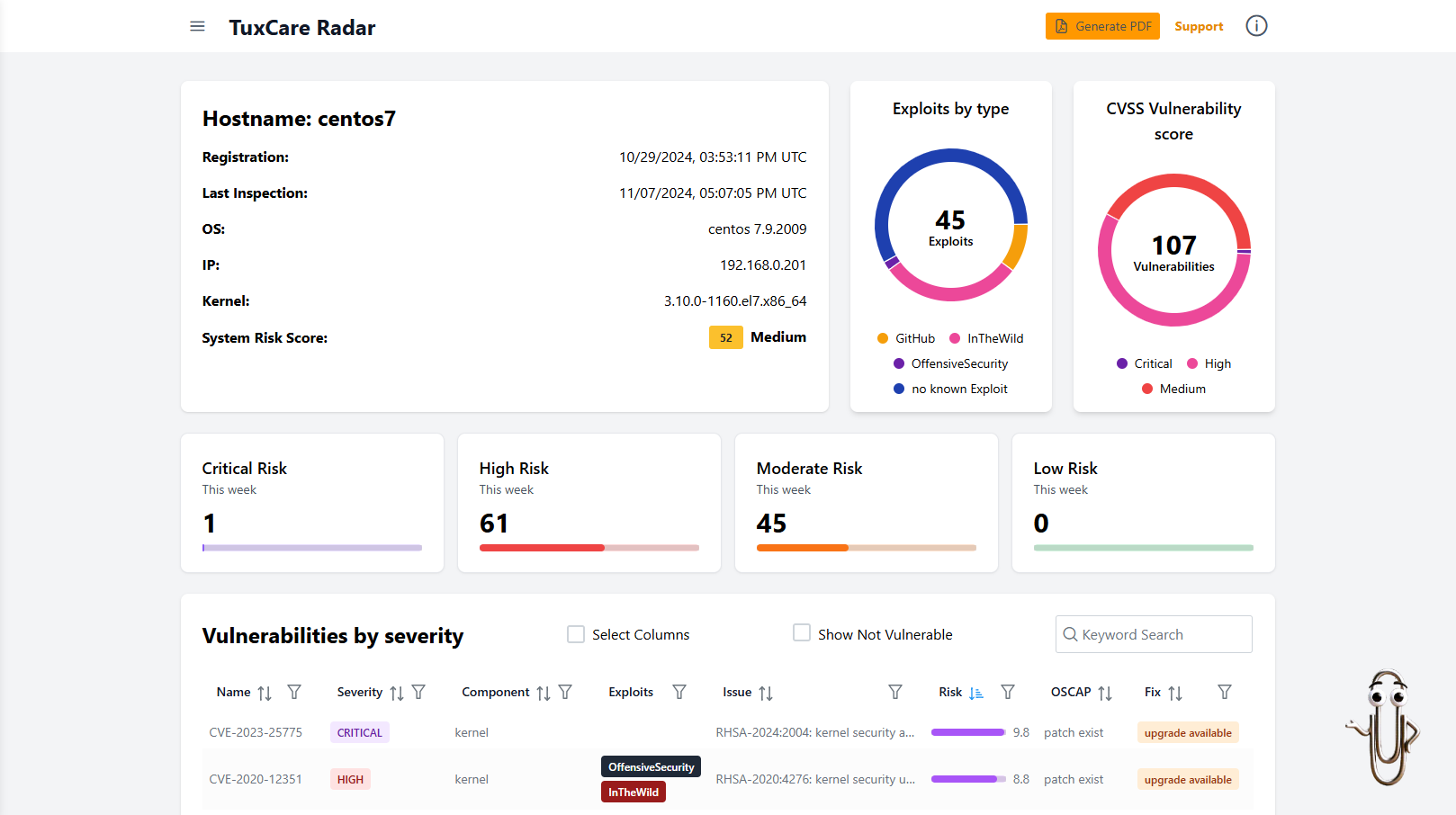
Here’s how it stands out:
AI-Assisted Risk Scoring: Radar prioritizes vulnerabilities with AI-driven risk scoring and factors in CVSS scores, patch availability, real-time threat intelligence, and more — so you can focus on what actually matters.
Fewer False Positives: Its intelligent matching engine understands your system’s real patch and package state, drastically reducing false alerts. It provides even deeper accuracy when used with tools like KernelCare and Endless Lifecycle Support.
Actionable Remediation Guidance: Provides clear, actionable vulnerability response steps for verified CVEs, saving hours that would otherwise be spent triaging false alerts.
Linux-Native Accuracy: Built specifically for Linux workloads, Radar delivers higher precision than general-purpose scanners.
Audit-Ready Vulnerability Reporting: Generate clear, exportable PDF and Excel summaries that make it easy to stay compliant, streamline audits, and provide visibility to stakeholders.
Radar helps you cut through the noise, save time, and stay focused on real risks — not false alarms.
Common Challenges with False Positive Vulnerabilities
The scenario where security teams feel overwhelmed with false positives is a nightmare for every organization. By understanding the common challenges organizations can fine-tune their security tools and processes in such a way that they remain efficient and accurate.
Backported Patches Confusing Scanners
Linux vendors frequently backport security patches, which means the latest fixes have been applied to older package versions without changing version numbers. Some scanners, however, flag vulnerabilities based on version data, misinterpreting patched packages as multiple versions, so one is still registered as vulnerable.
Generic Signatures Leading to False Matches
Signature-based scanners rely on pattern recognition, which can sometimes result in false matches when multiple software components share similar files, libraries, or paths. For example, a library included in a container might trigger a vulnerability alert even though it is not exposed or used at all.
Overlapping or Duplicate Alerts Across Tools
To mitigate risk, a lot of companies use multiple scanners like Nessus, OpenVAS, or Qualys, but sometimes these scanners report the same issues. The same CVE can appear multiple times with slightly different alert records or findings, thus making the analyzer’s job heavy with multiple entries for one issue. The confusion caused by this issue further slows down the analytical process as they struggle with validating the duplicate reports.
Limited Context Around Vulnerability Exploitability
Traditional scanners often report vulnerabilities without explaining whether they’re exploitable in your specific environment. For example, an Apache vulnerability might be reported even though the affected module isn’t loaded. This type of false alert leads to unnecessary time and effort spent on investigating the issue.
Manual Validation Consuming Too Much Time
Without automation, analysts have to go through the laborsome process of manually validating each and every finding with respect to patch levels, checking advisory databases, and so on. This process is error-prone and not at all practical in large Linux deployments.
Cut Through the Noise with Automated Vulnerability Management
False positives may seem harmless, but they drain time, obscure real risks, and weaken your security posture. As vulnerability data grows, relying solely on manual vulnerability check processes or traditional scanners isn’t possible in Linux environments. The solution to the problem is not to run more scans, it’s to scan smarter and patch faster.
TuxCare Radar delivers exactly that: a vulnerability management solution designed specifically for Linux environments. With TuxCare Radar, you get accurate, AI-assisted vulnerability detection that filters out noise and highlights the threats that actually matter.
And when it’s time to act, KernelCare helps with the automated deployment of security patches to your Linux systems without requiring reboots or downtime. Together, they give your team a continuous, automated defense cycle — from detection to protection.
Summary

False Positive Vulnerability: Causes, Risks & How to Avoid
Description
Learn what false positive vulnerabilities are, why they happen, and how to avoid them with best practices, tools, and automation.
Author
Rohan Timalsina
TuxCare
Publisher Logo

💸 Affordable Cloud Servers in Argentina! 🚀
At Full Tech Solutions, we offer Affordable Cloud Servers with high performance and advanced security, perfect for entrepreneurs, businesses, and developers looking for power at a budget-friendly price.
💰 Competitive Pricing: Power and flexibility without breaking the bank.
⚡ High Performance: Speed and stability for your applications.
🔒 Advanced Security: Protect your data with cutting-edge technology.
📞 24/7 Support: Our experts are ready to assist you anytime.
Don’t compromise quality for cost. Choose Full Tech Solutions and get the best affordable cloud servers in Argentina.
🌐 Scale your project with performance and savings!